
Videz votre tête.Libérez votre créativité.
Une idée, une tâche, un contact, une photo, un lien — capturez tout en trois secondes. Keepsake range le reste. Vous gardez l'esprit libre pour ce qui compte vraiment : créer.
Un clic — vous y êtes. Sans carte bancaire. 30 jours gratuits.







Des créateurs, entrepreneurs et auteurs construisent déjà leur mémoire sur Keepsake.
QuickNote : tapez une idée, Entrée — c'est capturé.
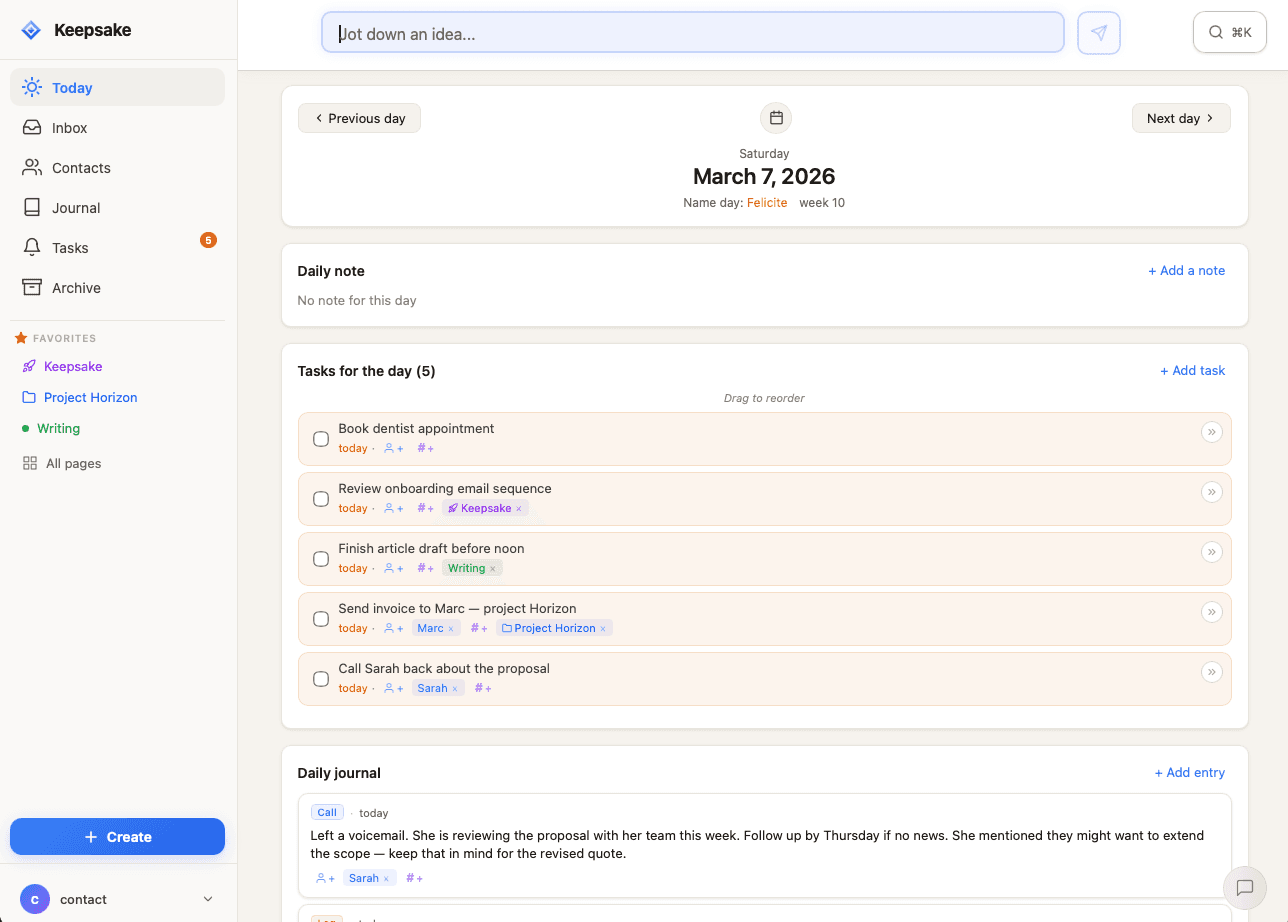
Notes, tâches, journal — toute votre journée en un clin d'œil
Votre tête n'est pas faite pour stocker votre vie.
Une idée surgit pendant que vous jouez avec vos enfants. Vous la gardez en tête « pour ne pas l'oublier ». Puis une deuxième. Puis dix. Et votre esprit ne se repose jamais.
Pendant ce temps, vos notes sont dans une app, vos tâches dans une autre, vos contacts dans une troisième. Rien ne communique.
Le vrai prix à payer, ce n'est pas le désordre. C'est de n'être jamais tout à fait présent, ni tout à fait libre de créer.
01 — Capturer
Notez-le. Oubliez-le. Retrouvez-le.
Ouvrez Keepsake, écrivez ou dictez : c'est dans votre Inbox. En trois secondes, sans choisir de dossier, sans rien décider. Même sans connexion.
Une tâche pour demain ? T+1. Une personne ? @Marie. Un projet ? #livre#. Keepsake comprend, et relie tout seul.
Votre tête se vide. Vos idées sont en sécurité. Vous revenez à ce que vous faisiez.
“Le système de QuickNote que je dicte dès qu'un truc me passe par la tête m'a vraiment allégé la charge mentale.”
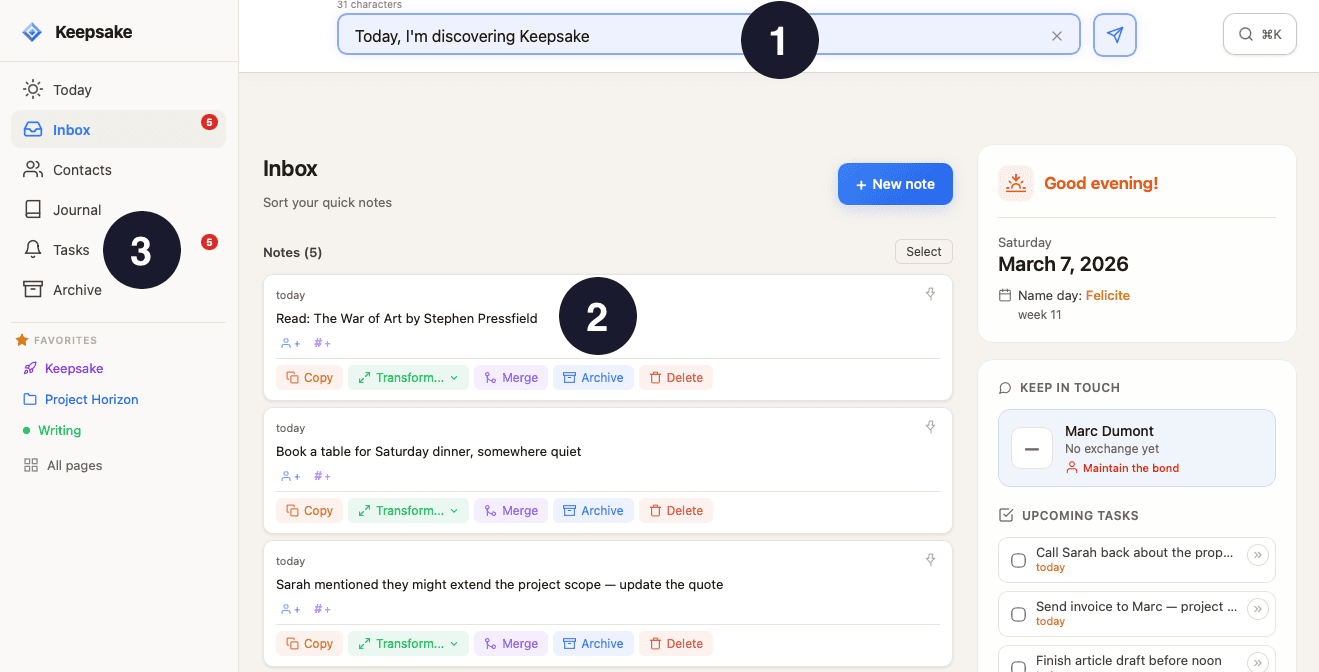
Capturez
Une idée vous traverse l'esprit ? Tapez, Entrée, c'est fait.
Retrouvez
Tout atterrit dans votre Inbox. Rien ne se perd.
Décidez
Transformez en tâche, en entrée contact, ou archivez.
02 — Organiser
Plongez dans le chaos. Keepsake tient le fil.
La création a besoin de désordre. Pas votre organisation.
Quand vous êtes prêt, votre Inbox se trie : une tâche par ici, une note par là, un projet qui prend forme. Les Tags & Pages deviennent des espaces vivants où tout ce qui touche un projet se rassemble. La vue Aujourd'hui structure votre journée par blocs, pas par horaires rigides.
Et au centre de tout : les gens. Liez n'importe quoi à un contact, ouvrez sa fiche, et retrouvez toute votre histoire commune. Avant un appel, vous savez exactement où vous en êtes.
“L'idée de rajouter des contacts est une excellente idée ! Je n'ai jamais rien vu de tel dans d'autres applications.”
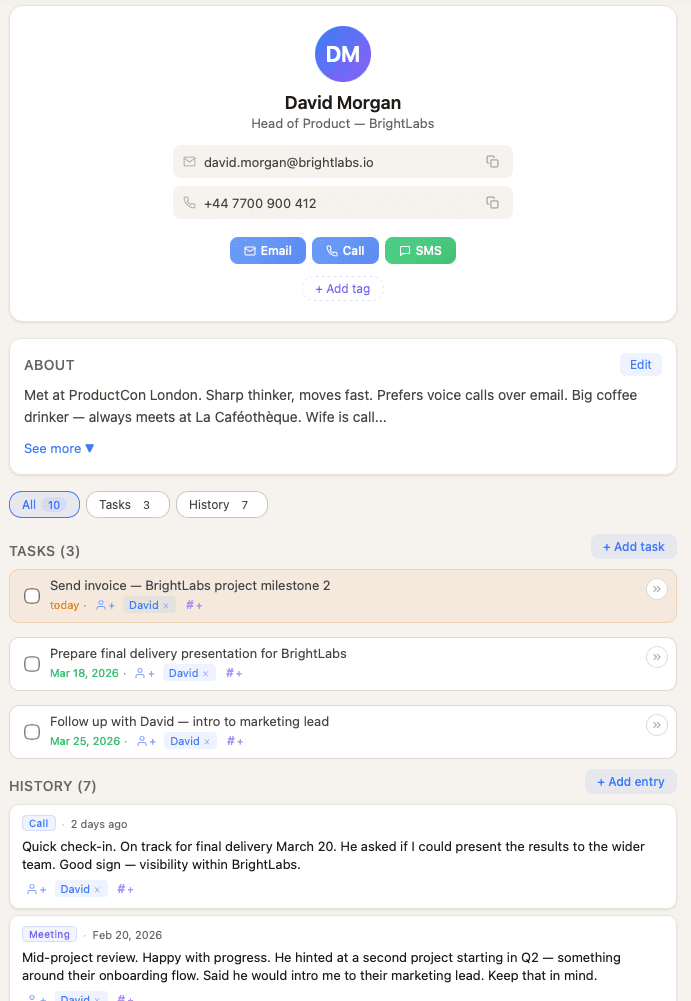
Triez
Votre Inbox se range en tâches, notes et projets.
Reliez
Tout se connecte aux personnes qui comptent.
Regroupez
Les Tags & Pages rassemblent un projet entier au même endroit.
03 — Partager
De l'étincelle au monde.
Vos meilleures idées ne méritent pas de moisir dans une Inbox.
Une note capturée ce matin peut devenir un article publié ce soir. À votre rythme : brouillon, relecture, publication. Vos textes vivent sur votre page Keepsake — keepsake.place/@vous — un espace calme pour vous exprimer. Pas de likes, pas de followers, pas le bruit des réseaux.
Partagez en un clic : Keepsake génère de belles cartes pour vos publications. Vos lecteurs s'abonnent. Vous leur écrivez une newsletter, envoyée par Keepsake. Aucune plateforme entre vous et eux. Votre audience vous appartient.
“Keepsake est un piège à idées, qui capture tout ce qui passe par ma tête pour construire quelque chose d'intéressant.”
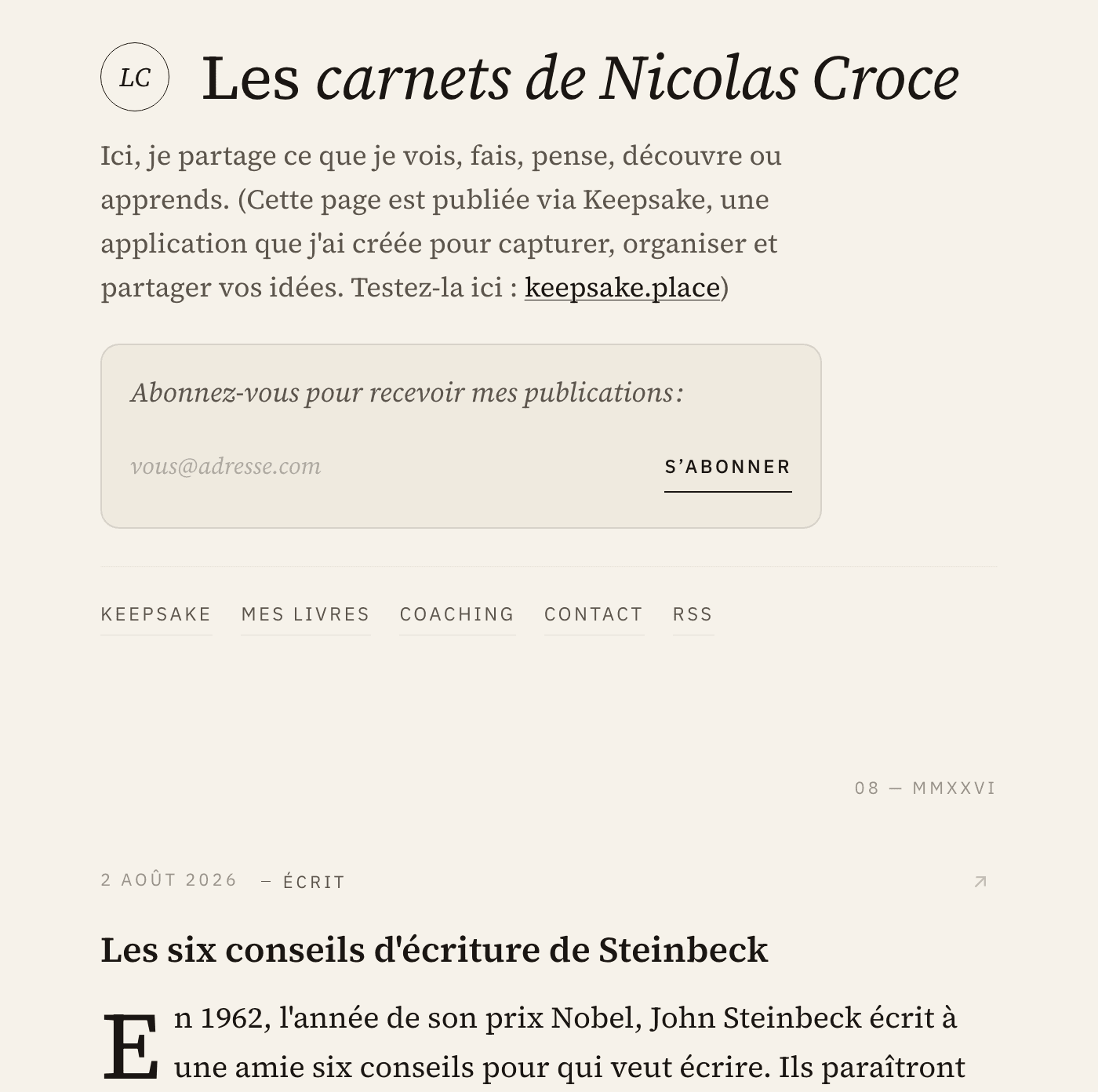
Rédigez
Transformez une note en brouillon, puis en article fini.
Publiez
Votre page, votre espace — sans le bruit des réseaux.
Fédérez
Vos lecteurs s'abonnent. Votre audience vous appartient.
30 jours gratuits · Sans carte bancaire
Plus vous l'utilisez, plus il devient irremplaçable.
Keepsake n'est pas un outil qu'on adopte puis qu'on remplace. C'est un système qui se compose.
Chaque note, chaque contact, chaque projet s'ajoute aux précédents. Les connexions se multiplient. Et un jour, sans y avoir pensé, vous disposez d'une mémoire que personne d'autre ne possède : la vôtre, structurée, vivante.
Les intérêts composés, appliqués à votre vie intellectuelle et relationnelle.
“Je conclus mes journées sur Keepsake et ça commence à devenir un réflexe.”
Keepsake n'est pas pour tout le monde. Tant mieux.
C'est pour vous si…
- vous débordez d'idées et redoutez d'en perdre
- vous jonglez entre un travail alimentaire et un projet passion sans vouloir tout mélanger
- vous voulez créer l'esprit libre — et, un jour, publier sans dépendre d'un algorithme
Ce n'est pas pour vous si…
- vous cherchez un énième gestionnaire de tâches
- vous voulez un CRM pour conclure des ventes
- votre système actuel vous convient parfaitement — gardez-le, sincèrement
Ce que disent nos utilisateurs
« La prise en main a été très rapide. L'idée d'ajouter des contacts est excellente — je n'ai jamais rien vu de tel dans d'autres applications. Je conclus mes journées sur Keepsake et ça commence à devenir un réflexe. »
— Massi
« Efficace pour libérer le cerveau et bien planifier ma journée. J'aime beaucoup l'idée de noter en vrac ce qui nous passe par la tête et de classer tout ça plus tard. »
— Claude
« Cela va m'aider à regrouper toutes mes pensées et peut-être en finir avec les notes et listes sur des bouts de papier qui s'accumulent. »
— Sandrine
« Un vide-cerveau qui m'aide à m'organiser. J'aime la simplicité et la rapidité que l'application apporte. »
— Eric
« Application bien pensée car à la fois simple et efficace ! »
— Armelle
« Super expérience pour le moment — hâte de la voir évoluer. »
— Emmanuelle
« Votre système pour se vider la tête est très intéressant. »
— Yvan
« Merci pour cette très belle application et les améliorations constantes que vous lui apportez. »
— Philippe
« Je découvre l'application et la méthode d'organisation qui va avec. À date, j'aime beaucoup ! »
— Rosalie
30 jours gratuits · Sans carte bancaire
Pourquoi ne pas simplement utiliser...
Notion ou Obsidian ?
Vous devriez construire la structure vous-même—décider des bases de données, créer des templates, tout lier manuellement. Keepsake est conçu pour vous dès le premier jour.
Un CRM comme HubSpot ?
Les CRM sont faits pour les équipes de vente et les pipelines. Keepsake est pour les relations personnelles—amis, collaborateurs, gens qui comptent pour vous, pas des leads.
Todoist ou Things ?
Les gestionnaires de tâches sont super pour les listes. Mais ils ne connectent pas les tâches aux personnes ou au contexte. Keepsake vous montre pourquoi chaque tâche compte et pour qui.
Apple Notes ou Google Keep ?
Les apps de notes simples gardent tout isolé. Pas de connexions entre personnes, tâches et notes. Tout reste dans des silos séparés.
Questions
Commencez à utiliser Keepsake immédiatement avec accès complet. Aucune carte bancaire requise—créez simplement votre compte et explorez tout pendant 30 jours. Vous n'entrerez vos informations de paiement que si vous décidez de vous abonner.
Une seule formule, tout inclus : 9 €/mois ou 89 €/an (soit 7,42 €/mois — environ deux mois offerts). Vos 30 premiers jours sont gratuits, sans carte bancaire — vous ne décidez qu'après avoir vu ce que Keepsake change pour vous.
Notion est flexible mais nécessite de la configuration—bases de données, templates, structure. Keepsake est conçu dès le premier jour : structuré autour de votre journée et de vos relations. Pas de configuration. Utilisez-le, c'est tout.
Pas au sens traditionnel. Les CRM sont pour les équipes de vente—leads, pipelines, conversions. Keepsake est pour les relations personnelles : collaborateurs, amis, gens qui comptent. C'est pour se souvenir, pas pour vendre.
Les gestionnaires de tâches sont parfaits pour les listes. Mais ils ne connectent pas les tâches aux personnes ou au contexte. Keepsake vous montre pourquoi chaque tâche compte et pour qui—vos tâches vivent aux côtés de vos notes et relations.
Oui, toujours. Vos données vous appartiennent. Exportez tout à tout moment dans des formats standards. Pas de verrouillage, pas de données en otage.
Vos données sont chiffrées et stockées de manière sécurisée. Nous ne vendons pas vos informations, n'affichons pas de pub et n'utilisons pas votre contenu pour entraîner des IA. La vie privée est fondamentale.
Vos données vous appartiennent — toujours. Vous pouvez tout exporter à tout moment dans des formats standards. Si le service devait s'arrêter un jour, nous préviendrions tous les utilisateurs à l'avance, maintiendrions le service actif assez longtemps pour que chacun récupère ses données, et fournirions des outils d'export supplémentaires si nécessaire. C'est un engagement mutuel.
Oui ! Installez Keepsake sur votre téléphone comme une vraie app — ça fonctionne parfaitement sur téléphone, tablette et ordinateur. Vos données se synchronisent sur tous vos appareils.
Pas du tout. Keepsake démarre avec une Inbox vide qui se remplit naturellement au fil de votre utilisation. Rien à importer, aucune structure à construire. Le but n'est pas de remplacer votre historique, mais de mieux organiser votre avenir. Vous pouvez importer vos contacts depuis un fichier vCard si vous le souhaitez, mais c'est totalement optionnel.
Oui. Transformez une note en article, publiez-le sur votre page Keepsake (keepsake.place/@vous), et vos lecteurs peuvent s'abonner. Keepsake envoie automatiquement une newsletter (quotidienne ou hebdomadaire) avec vos nouvelles publications. Votre liste d'abonnés vous appartient, et vous pouvez l'exporter à tout moment.
Apple Notes stocke des notes. Keepsake connecte vos notes, tâches et contacts dans un seul système. Ce sont les connexions entre eux qui vous font gagner du temps — savoir qui a dit quoi, ce qu'il reste à faire avec quelqu'un, et ce qui s'est passé quand. Si votre système actuel fonctionne, gardez-le. Mais si vous sentez que des choses vous échappent, Keepsake est fait pour ça.
Aujourd'hui, videz votre tête. Dans un an, contemplez ce que vous avez construit.
30 jours gratuits. Sans carte bancaire. Puis 9 €/mois ou 89 €/an — annulez quand vous voulez.
Voir les tarifs →